Zones
Automatically start and stop clicking when your cursor enters or leaves a custom set zone.
The open source auto-clicker for Windows. No ads, all features. Hotkeys, custom profiles, and no limits on speed.
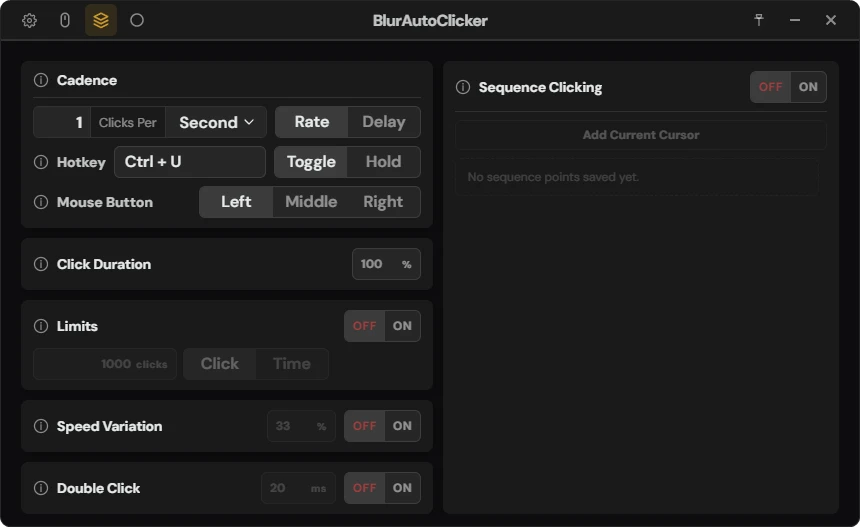
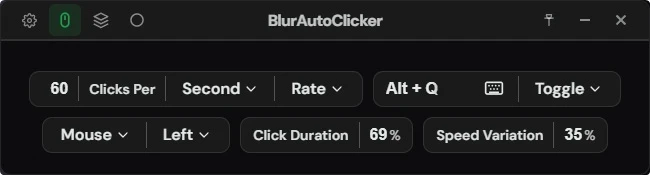
Switch to a compact mode when you only need the core click settings.
Advanced mode lets you change everything in one place with the addition of info buttons if you need it.
BlurAutoClicker is fully open source under the GPL-3.0 license. Contributions, issues, and feature requests are welcome on GitHub, or my Discord.
Pick points on your screen and the mouse will automatically navigate and click each one.
Automatically start and stop clicking when your cursor enters or leaves a custom set zone.
Slightly varies the click speed. This does not save you from getting banned. This is not a tool for cheating in videogames.
Supports nearly every mouse and keyboard combination with hold and toggle modes.
Automatically perform a double click every time the clicker triggers.
Time and click amount limits let you automatically stop the clicker when a threshold is reached.
We also support spamming keyboard keys, not only mouse.
Control exactly how long each click holds the button or key down.
Save and switch between different configurations instantly.
Keep the clicker running quietly in your system tray.
Always need the clicker? Start it with Windows.
Switch between light and dark themes to suit your preference.
Track your total clicks and usage — all stored locally on your device.
One-click update prompts so you never have to check GitHub manually.
Everything you need is in one place — tweak every aspect of the clicker.
Need help? Join the Discord or support the project on Ko-Fi.
Yes. BlurAutoClicker is free and open source under the GPL-3.0 license.
No. BlurAutoClicker is fully open source — every line of code is publicly available on GitHub for anyone to inspect.
Why does Windows show a SmartScreen warning? SmartScreen warns about apps that Microsoft hasn't seen enough downloads from yet. It does not mean malware was detected. Removing this warning requires a code signing certificate costing $600+/year — not worth it for a free, open source tool.
Why do virus scanners flag it? Many scanners use heuristic/ML detection that flags common patterns — like reading and writing files — without understanding context. Any installer does this. You can scan the source code yourself or check the GitHub releases.
No. The app is built for Windows. The download buttons point to Windows release files only.
By default clicks per second is limited to 500. In the settings you can increase the cap to 1000. Keep in mind that most online games can only register 60 clicks per second (server tick rate). Increasing the clicks per second beyond this limit has 0 effect other than using more system resources (in games). Using very high click speeds can crash games and browsers, so be careful.